+
.com
USD
  • Account
  • Sign Up
  • Sign In
You have no items in your shopping cart.
ABOUT 1OUTLETS
Home Shopping Other NEW AUTODESK AUTOCAD KEYBOARD SHORTCUT STICKERS
4Keyboard NEW AUTODESK AUTOCAD KEYBOARD SHORTCUT STICKERS

4Keyboard NEW AUTODESK AUTOCAD KEYBOARD SHORTCUT STICKERS

Brand

4Keyboard

( 438 reviews ) See Reviews (1Outlets)

In stock *In Stock - Subject to stock availability at point of fulfilment. In the event whereby the item is out of stock or unable to provide the service, 1Outlets will cancel the order and issue a Full refund in-store credit to you. SKU : 6b12b06b43c02b30f0cd573a494ac2bd

Qty:

**Free Shipping Worldwide available - Shipping time may vary depending on the address.

**Circumstances Reroute - This is a time of great stress and uncertainty. We are actively validating, routing and re-routing orders with our overseas merchants, logistic partners and airlines. Deliveries and supply may expect delays.

**In Stock (Low Inventory Warning) - Subject to stock availability at point of fulfilment. In the event whereby the item is out of stock or unable to provide the service, 1Outlets will cancel the order and issue a Full refund in-store credit to you (See Refunds).

**Report or Request Removal  - Any copyrighted, DMCA, inappropriate, offensive, prohibited, potentially Illegal Listings (Submit doc here).

Details

Conquer CAD with 4Keyboard!

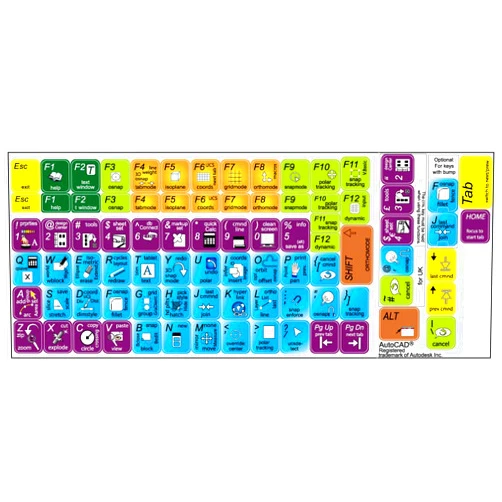
Master AutoCAD faster than ever with the 4Keyboard NEW AUTODESK AUTOCAD KEYBOARD SHORTCUT STICKERS. These vibrant, easy-to-read stickers transform your keyboard into a powerful command center, putting essential shortcuts right at your fingertips. Learn AutoCAD commands effortlessly and boost your productivity.

Main Features

  • Intuitive Design: Clear, concise layout for quick learning and reference.
  • Durable Material: High-quality vinyl stickers that withstand daily use.
  • Complete Coverage: Covers a wide range of commonly used AutoCAD commands.
  • Easy Application: Simple peel-and-stick application for fuss-free installation.
  • Customizable Layout: Arrange the stickers to perfectly suit your workflow.

Benefits

  • Increased Efficiency: Access commands instantly, speeding up your workflow.
  • Improved Accuracy: Minimize errors by reducing typing and mouse clicks.
  • Enhanced Learning: Learn and remember AutoCAD shortcuts effortlessly.
  • Boosted Productivity: Complete projects faster and more efficiently.
  • Stress-Free Workflow: Simplify complex tasks and streamline your design process.

Unique Selling Points / Competitive Advantages

  • Comprehensive Command Set: Includes a greater variety of essential commands compared to similar products.
  • Ergonomic Design: Optimized sticker placement minimizes hand strain.
  • Vibrant Colors: Highly visible stickers, easy to spot even in low light.
  • Premium Material: Superior quality stickers ensuring long-term usability and durability.
  • Detailed Instructions: Simple, clear instructions included with the stickers.

Usage Scenarios

  • Students: Learn AutoCAD shortcuts quickly and efficiently during training.
  • Professionals: Boost productivity and accelerate project completion.
  • Design Enthusiasts: Improve skills and explore AutoCAD functionalities.
  • Home Users: Master AutoCAD commands for personal design projects.
  • Educators: Support effective AutoCAD instruction in classrooms and workshops.

Customer Reviews / Testimonials

  • "These stickers are a game-changer! I've learned so many new shortcuts. Highly recommend!" - Anya Petrova, Russia, 2023
  • "A fantastic tool for students! Makes learning AutoCAD much easier and fun." - David Lee, Canada, 2024
  • "Increased my workflow efficiency tremendously! A great investment for any AutoCAD user." - Maria Hernandez, Mexico, 2023
  • "The stickers are incredibly durable and easy to apply. Great quality!" - John Smith, USA, 2022
  • "Highly recommend these stickers for anyone wanting to improve their AutoCAD skills." - Sophie Dubois, France, 2024

Frequently Asked Questions (with answers)

  • Q: Are these stickers reusable? A: While designed for long-term use, reusability may be limited depending on application surface.
  • Q: Can I use these with other CAD software? A: These AutoCAD keyboard shortcut stickers are specifically designed for Autodesk AutoCAD software.
  • Q: What kind of surface do these stickers work best on? A: They adhere well to most smooth, clean keyboard surfaces.
  • Q: Are the stickers easy to remove? A: They are designed to be durable, so removal might leave some residue, but generally they are easily removable.
  • Q: How many stickers are included in the package? A: The package contains a comprehensive set of AutoCAD keyboard shortcut stickers for enhanced efficiency.

BUY NOW

Elevate your AutoCAD experience and unlock your full design potential with 4Keyboard's innovative Autodesk AutoCAD keyboard shortcut stickers. Transform your keyboard, accelerate your workflow, and design with confidence today!

(Beta: User Generated 2024.0007)
Specification
Category: Other
Brand:

4Keyboard

Weight: 0.0283495231kgs
Color: Black
Pattern: Letter Print
UPC: 882798203616
Item model number: Autodesk_Autocad_stick_keyboard
Manufacturer Part Number: Autodesk_Autocad_stick_keyboard
Terms & Warning