+
.com
USD
  • Account
  • Sign Up
  • Sign In
You have no items in your shopping cart.
ABOUT 1OUTLETS
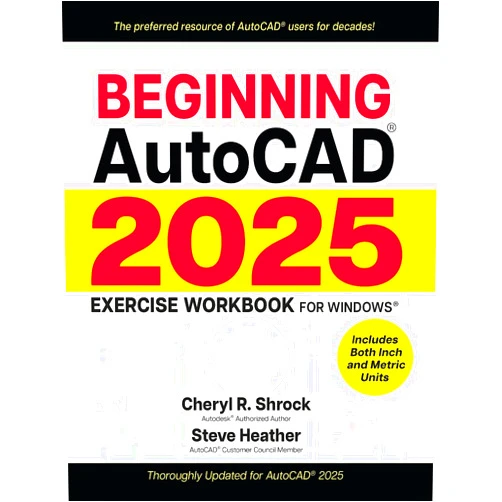
Home Shopping Other Beginning AutoCAD® 2025 Exercise Workbook: For Windows®
By Cheryl R. Shrock (Author), Steve Heather (Author) Beginning AutoCAD® 2025 Exercise Workbook: For Windows®

By Cheryl R. Shrock (Author), Steve Heather (Author) Beginning AutoCAD® 2025 Exercise Workbook: For Windows®

( 138 reviews ) See Reviews (1Outlets)

In stock *In Stock - Subject to stock availability at point of fulfilment. In the event whereby the item is out of stock or unable to provide the service, 1Outlets will cancel the order and issue a Full refund in-store credit to you. SKU : 5122616741461e04d78516f64bad5793

USD44.38
  • Buy 2 for USD44.07 each and save 1%
  • Buy 10 for USD43.65 each and save 2%
Qty:

**Free Shipping Worldwide available - Shipping time may vary depending on the address.

**Circumstances Reroute - This is a time of great stress and uncertainty. We are actively validating, routing and re-routing orders with our overseas merchants, logistic partners and airlines. Deliveries and supply may expect delays.

**In Stock (Low Inventory Warning) - Subject to stock availability at point of fulfilment. In the event whereby the item is out of stock or unable to provide the service, 1Outlets will cancel the order and issue a Full refund in-store credit to you (See Refunds).

**Report or Request Removal  - Any copyrighted, DMCA, inappropriate, offensive, prohibited, potentially Illegal Listings (Submit doc here).

Details

Conquer AutoCAD 2025 with Ease!

Master the exciting world of computer-aided design with Beginning AutoCAD® 2025 Exercise Workbook: For Windows®. This comprehensive workbook provides a fun, step-by-step approach to learning AutoCAD, perfect for beginners of all ages. Packed with engaging exercises and clear explanations, this workbook transforms complex concepts into easily digestible, exciting lessons. You'll build confidence and skills, mastering essential AutoCAD tools and techniques in no time!

Main Features

  • Interactive Exercises: Each chapter features a variety of practical exercises that build upon one another.
  • Step-by-Step Instructions: Clear and concise instructions guide users through each exercise.
  • Visual Aids: Abundant illustrations and screenshots enhance understanding.
  • Windows® Compatibility: Designed specifically for the Windows® operating system.
  • Beginner-Friendly Approach: The workbook caters specifically to those new to AutoCAD.

Benefits

  • Improved AutoCAD Skills: Develop foundational AutoCAD skills for various applications.
  • Enhanced Confidence: Gain self-assurance in using the AutoCAD software.
  • Faster Learning: Learn at your own pace with easy-to-follow instructions.
  • Increased Creativity: Explore design possibilities with newfound AutoCAD expertise.
  • Better Career Prospects: Acquire a valuable skill sought after in many industries.

Unique Selling Points / Competitive Advantages

  • Focus on Practical Application: Emphasizes hands-on experience to solidify learning.
  • Clear and Concise Explanations: Avoids technical jargon for easy comprehension.
  • Engaging and Fun Approach: Makes learning AutoCAD enjoyable and exciting.
  • Comprehensive Coverage of Fundamentals: Covers all essential aspects for beginners.
  • User-Friendly Design: Visually appealing and simple to navigate.

Usage Scenarios

  • Students learning CAD: Perfect for educational institutions and home schooling.
  • Hobbyists exploring design: Ideal for those wanting to learn AutoCAD as a pastime.
  • Professionals transitioning careers: A great resource for developing new skills.
  • Anyone interested in design: An excellent starting point for exploring the world of CAD.
  • Early career professionals: A valuable asset for enhancing job performance.

Customer Reviews / Testimonials

  • "This workbook made learning AutoCAD fun and accessible!" - Maria Sanchez, Spain, 2024
  • "The step-by-step approach is fantastic. I highly recommend this for beginners." - David Lee, Canada, 2023
  • "I learned more in a week with this workbook than I did in months with other resources!" - Aisha Patel, India, 2024
  • "Excellent resource for understanding the fundamentals of AutoCAD." - John Smith, Australia, 2023
  • "This AutoCAD workbook helped me land my dream job!" - Sarah Jones, UK, 2024

Frequently Asked Questions (with answers)

  • Q: Is this workbook suitable for absolute beginners? A: Absolutely! It's designed specifically for those with no prior AutoCAD experience.
  • Q: What version of AutoCAD does this workbook cover? A: This workbook covers AutoCAD 2025.
  • Q: What type of exercises are included? A: A wide variety of hands-on exercises covering fundamental AutoCAD commands and techniques.
  • Q: Is this workbook suitable for children? A: Yes, its child-friendly approach and engaging style makes it suitable for young learners interested in CAD.
  • Q: Does it require any prior design experience? A: No prior design experience is necessary.

BUY NOW

Discover the joy of designing with Beginning AutoCAD® 2025 Exercise Workbook: For Windows®! Transform your creative vision into reality. Master AutoCAD today and unlock a world of exciting possibilities. Start your AutoCAD adventure now!

(Beta: User Generated 2024.0007)
Specification
Terms & Warning